Technical Guides
How a Manual Pulse Generator Works: From Detent Click to Axis Move
AMAG Team7 min read
Watch a good setup machinist bring a cutter down towards a reference surface and the jog buttons barely get touched. For anything that matters, the last half millimetre of an approach, sweeping in a vice, splitting an edge, the hand goes to the wheel. The manual pulse generator is the least glamorous control on a CNC machine, and the one operators trust most.
That trust is earned by the design: a simple instrument doing one job extremely well. That's what explains why the detents are there, what the multiplier switch is actually changing, and how the whole assembly can lose its cable without the control ever noticing.
The wheel is an encoder
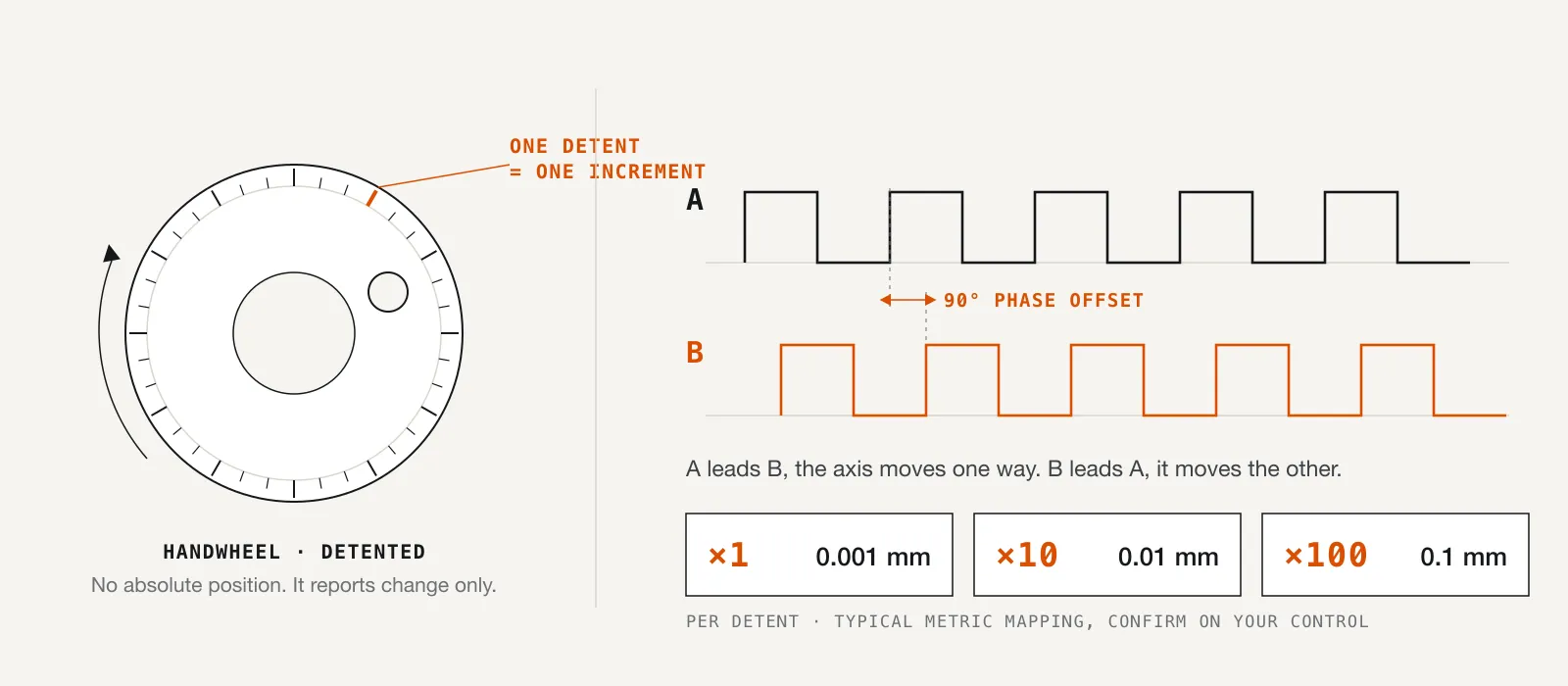
Strip away the crank handle and the graduated bezel and a handwheel is a rotary encoder. MPGs conventionally use quadrature encoding: two output channels, usually called A and B, each producing a square wave as the wheel turns, with the two waves held 90 degrees out of phase with each other.
That phase offset is the entire trick. Turn the wheel one way and channel A's edges arrive just ahead of channel B's; turn it the other way and B leads A, giving the control direction for free. Distance comes from counting edges: every transition on either channel is a known fraction of a wheel revolution, so a running count is a running record of how far the wheel has turned.
Notice what's absent: absolute position. The control has no idea where the wheel "is," and it doesn't need to know. A handwheel is a purely incremental device. It reports change, nothing else, which is exactly what jogging requires. That's also why it never needs referencing, never loses its place after a power cycle, and behaves the same whether it's been spun ten thousand times or is fresh from the box.
A click is a contract
If the encoder were the whole story, a smooth, free-spinning knob would do the job. It doesn't. The detents, the spring-loaded mechanism that settles the wheel into evenly spaced notches, matter as much as the electronics.
A detent converts continuous rotation into a discrete, countable, feelable unit. When the wheel drops into the next notch, you feel it in your fingertips, often hear it, and the axis has moved by exactly one increment.
That makes each click a contract: one click, one known move, and no half-click is possible. The position you feel and the count the control received always agree. A machinist can keep both eyes on a dial indicator needle and count four clicks back by feel alone, something a jog button simply can't do.
Multipliers: the same click at three different stakes
Controls conventionally offer step multipliers, usually labelled x1, x10, and x100, and on metric machines these commonly map to 0.001 mm, 0.01 mm, and 0.1 mm of axis travel per detent. That mapping is a common convention, not a universal law, so confirm what your control actually does before relying on it.
The multiplier doesn't change the wheel; it changes the stakes of each click. At x1, a click is a micron-scale nudge, right for the final approach to an indicator zero, where the needle should creep rather than jump. At x10 you cover working distances at a deliberate, watchable pace.
At x100, each click is a tenth of a millimetre, and a quick flick of the wrist strings dozens together, covering the table fast. It makes mistakes just as fast, too: a brisk half-turn at x100 next to a finished surface is how gouged parts and snapped tools happen.
The habit that prevents it is boring and absolute: look at the multiplier switch before you touch the wheel, every time, and treat x100 near a workpiece with the same respect you give a rapid move. Experienced operators step down through the range as they close on a surface: x100 to get into the neighbourhood, x10 for the approach, x1 for the last few thousandths of a millimetre.
Why a wheel beats jog buttons where it counts
Jog buttons command motion; the wheel is motion. That sounds philosophical until you are 0.05 mm away from where you need to be.
With a button, you operate a switch and observe the outcome: press, watch, release, evaluate, press again, with the correction loop running through your eyes alone.
A handwheel works differently. Axis position is coupled to hand position, so you slow the axis by slowing your fingers, easing off as the indicator comes around to zero. The feedback is proprioceptive, not just visual.
Reversal is the other half of the argument. Overshoot with a jog button, and you have to release it, find the opposite button, and press again while the mistake sits there. Overshoot with a wheel, and the recovery is the same motion, just run backwards, often before the overshoot has fully registered.
Pendant anatomy: everything under one hand
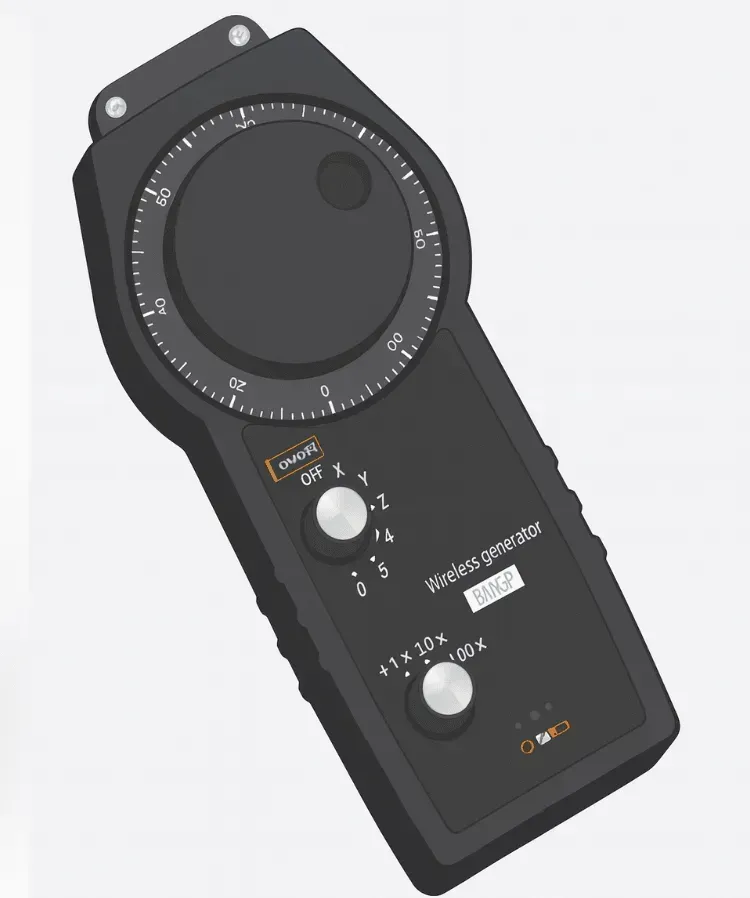 The whole context under one hand: graduated wheel, axis selector, and x1/x10/x100 multiplier.
A bare wheel isn't enough on a machine with several axes, so pendants carry an axis-select switch, letting the operator choose which axis the clicks drive, and the multiplier switch alongside it. Both sit within thumb's reach, so there's no walk back to the panel to change what the wheel means.
Two safety elements are standard on pendants generally. A spring-loaded enable switch, sometimes called a deadman, must be actively held for motion to be permitted; release it and motion stops, so a dropped, bumped, or set-down pendant can't command a move. An emergency stop sits on the pendant too, since the person holding it usually stands closest to the motion.
Losing the cable without losing the plot
A wireless MPG is conceptually straightforward: the pendant digitises the wheel counts and the state of every switch, sends them to a receiver at the machine's electrical cabinet, and the receiver reproduces those signals in the form the control expects. To the CNC, the arrangement looks exactly like a wired handwheel. Which of the two belongs on a given machine is a separate question, worked through in wireless MPG vs. wired handwheel.
The part that deserves scrutiny in any wireless design is what happens to the safety functions. Done properly, the enable switch and emergency stop remain part of the system, and the design behaves conservatively: without a valid operator input, the machine should see no motion command at all. That's the behaviour to ask about when evaluating any wireless pendant.
From there, integration is a matter of your controller's conventions for accepting handwheel input, which vary by family. Consult your controller's parameter manual for specifics, and see our post on connecting a wireless MPG to your controller for how the process looks in principle.
What the AMAG unit brings to this
Here is what the AMAG Wireless MPG offers: control of up to 5 axes, which matters on machining centres with rotary axes where a wired pendant runs out of reach and selector positions; a 50-metre wireless range; no cable between operator and cabinet; and compatibility with Siemens, Fagor, Mitsubishi Electric, Fanuc, and Heidenhain controllers. It carries a 1-year warranty and is aimed at machining centres, mills, lathes, and large-format routers, anywhere setup work happens away from the panel. Full details are on the product page.
The wheel, unchained
The handwheel earned its place because it turns a human hand into a precision input device. Going wireless doesn't change that. It just lets you take the instrument to the work, instead of carrying the work's problems back to the panel. To see where that leads in practice, read about the setup workflows that actually change, or visit our Wireless MPG overview to see whether it fits your machines.
Related articles
Technical Guides
CNC Lubrication System Layout: Where the Pump, Lines and Distributors Go
Sizing tells you what to buy; layout decides if you can maintain it. Pump placement, trunk and branch routing, and where distributors must sit.
Technical Guides
When a Centralised Grease System Can Run NLGI 2
NLGI 2 belongs on a 30 MPa progressive circuit, not a GM or 35-type reservoir. The three grease pressure classes decide the grade, and what mixing them costs.
Technical Guides
How to Lubricate an Injection Moulding Machine: Tie Bars, Toggles, and Platens
Oil or semi-fluid grease on the clamp, why those points want pressure-volumetric metering, and the AMAG pump pairings that match a 35-type action window.