Technical Guides
How to Set Up a Wireless MPG: Workflows That Actually Change
AMAG Team7 min read
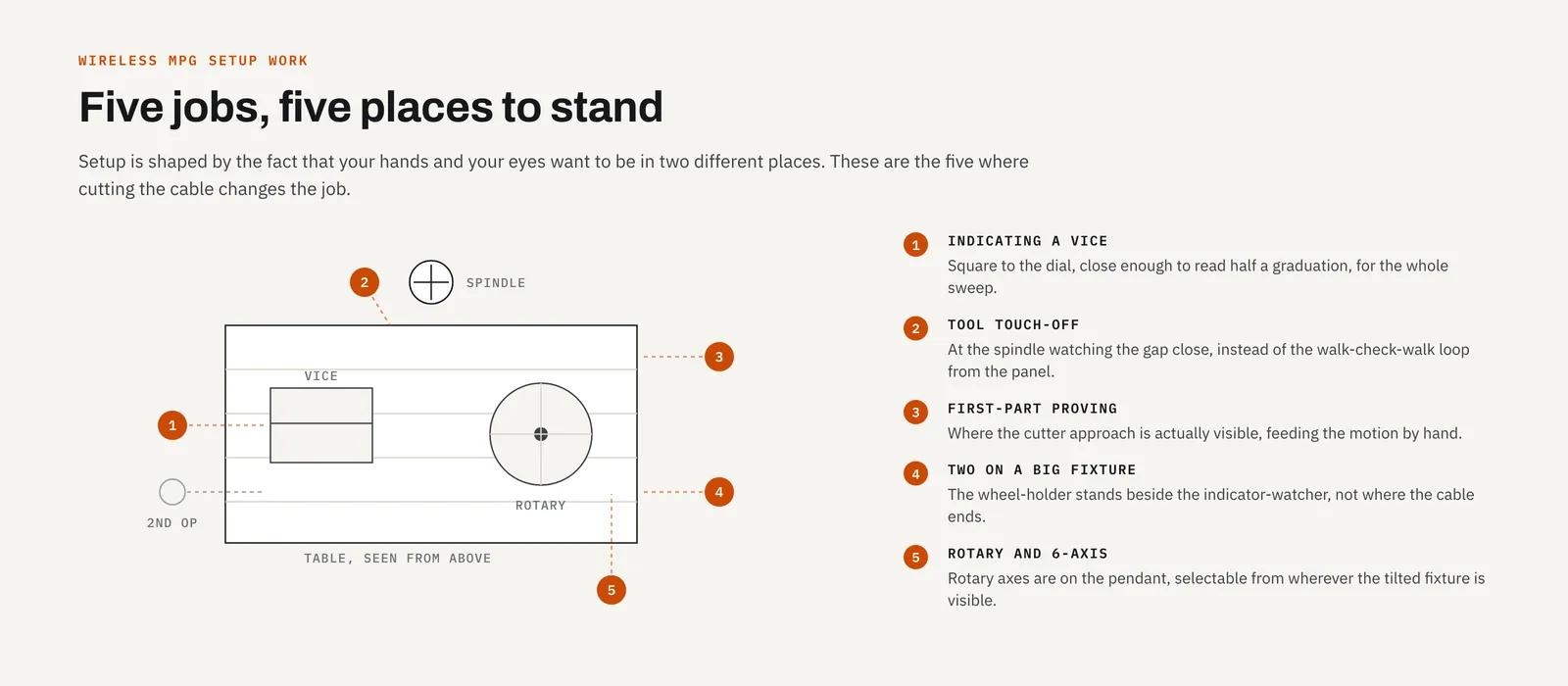
The obvious pitch for a wireless pendant is "no cables," and that's true as far as it goes. But nobody buys a machine control because of what it lacks. The real question is where being able to stand in the right place changes how the work gets done. Certain setup tasks are shaped by the fact that the operator's hands and eyes want to be in two different places, and a wired pendant, or worse, panel jog buttons, forces a compromise.
If you want the background on why a handwheel is the right instrument for these jobs, we've covered how manual pulse generators work separately. This post assumes you already trust the wheel and looks at five workflows where cutting its cable changes the job.
Indicating a vice or fixture
Sweeping in a vice is a two-part act. Your eyes belong on the dial indicator, level with the needle, close enough to read half a graduation. Your hand belongs on the wheel making 0.01 mm moves. The needle tells you what to do next, so the tighter the loop between seeing and turning, the faster and cleaner the sweep.
A wired pendant on a short leash turns this into contortion. The cable reaches most of the way, so you stand where it ends rather than where the indicator is, craning to read a dial face at an angle. Reading an indicator off-axis is a genuinely bad idea: the needle's position against the graduations shifts with your viewing angle, so a reading taken from the side isn't the reading.
With a wireless pendant you plant yourself where the indicator is easiest to read, square to the dial, and stay there for the entire sweep. Tap, read, tap, read, with no repositioning in between. It's the same task, minus the extra walking.
Tool touch-off and edge finding on large machines
On a small mill, the panel is an arm's length from the spindle and none of this matters. On a large VMC, a boring mill, or a gantry router, the panel can be metres from where the tool meets the work. Jogging from it means the walk-check-walk-check loop: jog a little, walk over, look, walk back, jog again. Most of that is walking, with a brief moment of actual looking buried somewhere inside it.
A pendant in hand at the spindle collapses the loop entirely. You stand at the tool, watch the gap close, and turn the wheel. Approach, verify, and correct all happen from a single position with your eyes on the actual event.
This is also where the AMAG unit's 50-metre range stops being a brochure number and becomes a working dimension. Large-format routers are one of the unit's stated applications. On a gantry machine, the far corner of the bed is exactly the place the panel can't see and a cable won't comfortably reach, so fifty metres means the pendant works everywhere the setup happens, not just near the cabinet.
First-part proving
Running a new program for the first time is the moment operators trust least, and rightly so. The traditional posture is standing at the panel, one finger near feed hold, watching the cutter from whatever angle the panel happens to offer. That angle is frequently a bad one: through a splash guard, past a column, at a distance where "is that going to clear?" is a judgment call.
Proving out with a pendant in hand changes the geometry of the moment. You stand where you can actually see the cutter approach the work, hand on the wheel, feeding the motion yourself at a rate your nerves are comfortable with. Because the wheel reverses instantly, your recovery from "that looks wrong" is already in your hand, not on a panel behind you. That's really the point of first-part proving. You want to be walking the machine through the cut, not just watching it happen to see if it goes badly.
Two operators on big fixtures
Large fixtures and heavy weldments often turn indicating into a two-person job: one person watches the indicator at one end of the setup, the other turns the wheel. With a wired pendant, the wheel-holder stands where the cable dictates, and the pair ends up shouting adjustments across the machine, with all the misheard "up a hair" instructions that implies.
Wireless removes the constraint on the second person entirely. The wheel-holder can stand wherever communication is easiest, next to the indicator-watcher or wherever they can see both ends of the fixture, instead of wherever the cable happens to reach.
Rotary axes and 5-axis setup
Machines with rotary axes multiply the setup positions. Indicating a part on a rotary table, tramming a trunnion fixture, or touching off on a face that only presents itself at a specific B-axis angle all involve working around the machine rather than in front of it. That means creeping up on an angle while watching an indicator or a scribe line, which is close to the whole reason a handwheel exists.
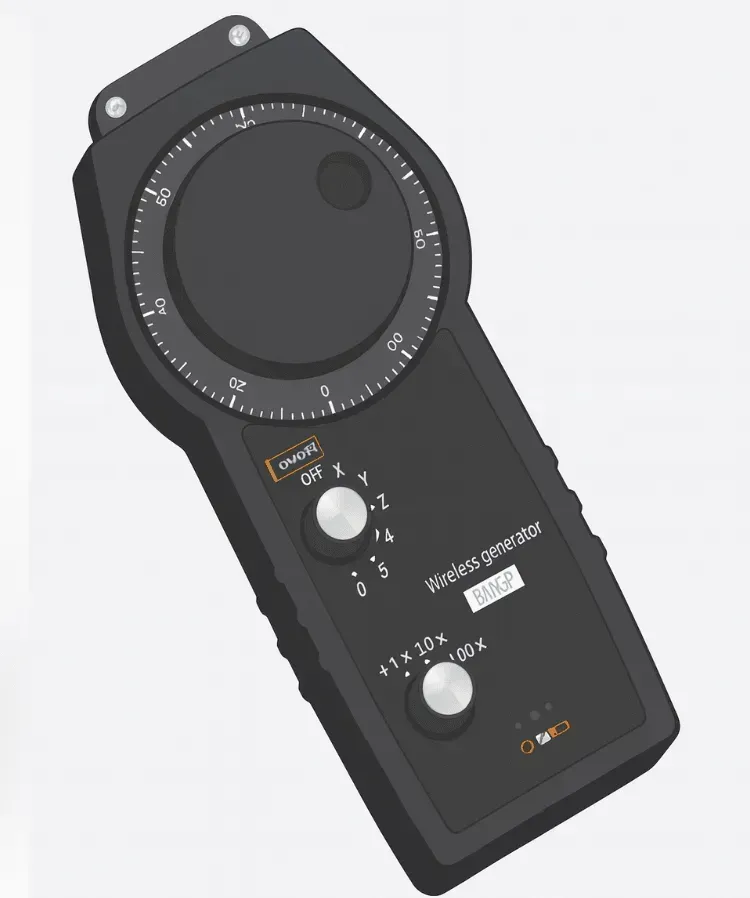
The AMAG Wireless MPG controls up to 5 axes, so rotary axes are on the pendant along with the linear ones, selectable from wherever you're standing around the machine. On a 5-axis machining centre, that means the person watching the indicator sweep on a tilted fixture is also the person commanding the rotation, from wherever the fixture is actually visible. The product page has the full compatibility list: Siemens, Fagor, Mitsubishi Electric, Fanuc, and Heidenhain.
 No cable to manage also means no cable to hang the pendant from between jobs, which is where the habits below come in.
The discipline wireless asks for in return
Honesty requires this section. A wireless pendant adds a few habits that wired pendants never needed. Shops that skip them tend to end up blaming the tool for problems the habits would have prevented.
First, a designated park spot. A wired pendant always hangs where the cable ends. A wireless one can be set down anywhere: on a workbench, buried under a print, knocked off a table edge. Pick one home for it, a holster or hook per machine, and make returning it there as automatic as returning a torque wrench to its drawer.
Second, a battery check at shift start. A cable delivers power. A battery delivers a to-do item, and the moment you discover a flat pendant is always mid-setup, never before it. Put the check where it can't be skipped, alongside your other pre-flight checks. We cover the environmental side of keeping the link solid, receiver placement and interference on a working floor, in a separate post on shop-floor RF reliability.
Third, know what this pendant does and doesn't carry: it has no enable (deadman) switch and no e-stop of its own. The machine's own safety chain does that job, unchanged by fitting the pendant. A dropped or parked wireless pendant doesn't have a spring-loaded switch protecting against it, so the discipline that matters is the park-spot habit above: put it down where it can't get bumped into commanding a move, and rely on the machine's panel for anything safety-critical.
None of these habits are burdensome, but they're real, and they belong in operator training rather than in a lessons-learned meeting after something goes wrong.
Where this leaves the panel
The panel keeps its job: programs, offsets, alarms, everything genuinely about the control rather than the work. What moves to the pendant is the class of task where a human is closing a loop with eyes and hands. The panel's location was always an accident of cabinet placement. Nobody actually designed it around how setup work happens on the floor.
For a broader look at what the technology offers beyond these workflows, see our overview of wireless MPG benefits. And if the workflows above describe your shop, the Wireless MPG page is the place to start.
Related articles
Technical Guides
CNC Lubrication System Layout: Where the Pump, Lines and Distributors Go
Sizing tells you what to buy; layout decides if you can maintain it. Pump placement, trunk and branch routing, and where distributors must sit.
Technical Guides
When a Centralised Grease System Can Run NLGI 2
NLGI 2 belongs on a 30 MPa progressive circuit, not a GM or 35-type reservoir. The three grease pressure classes decide the grade, and what mixing them costs.
Technical Guides
How to Lubricate an Injection Moulding Machine: Tie Bars, Toggles, and Platens
Oil or semi-fluid grease on the clamp, why those points want pressure-volumetric metering, and the AMAG pump pairings that match a 35-type action window.